
Tips for Moving Office Equipment Safely

Table of Contents
Plan Before You Pack: Inventory, Photos, and Cable Labels
How to Pack Computers for Moving and Protect Fragile Gear
Moving Office IT Equipment and Furniture Safely
Your Office Moving Checklist
Frequently Asked Questions
Last Updated: October 13, 2026
Plan Before You Pack: Inventory, Photos, and Cable Labels
Safe moves start before the truck arrives: a written inventory, photos of every connection, and labeled cables keep moving office equipment from becoming a week of downtime.
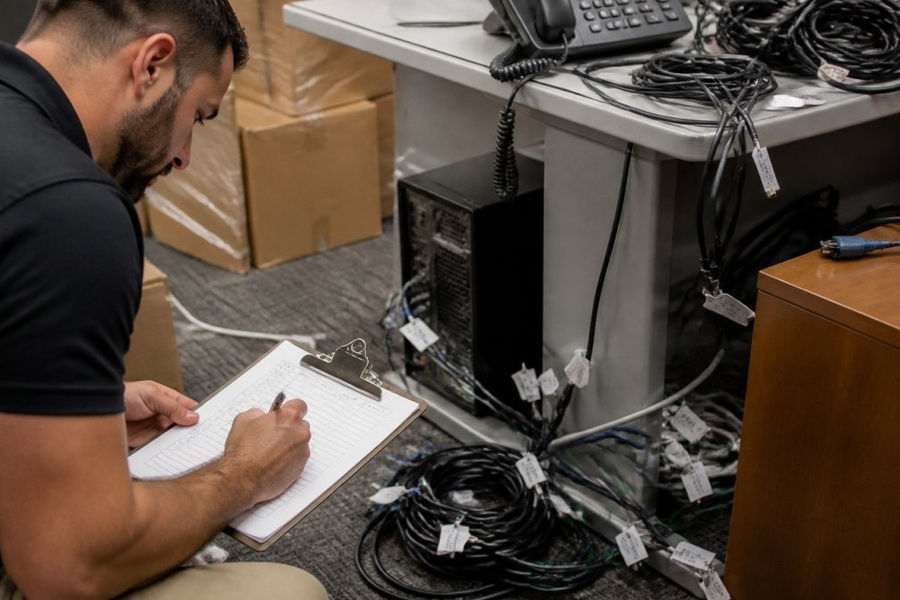
At Sergeant's Tactical Moving Company, a veteran-owned residential and commercial mover based in Marlton, planning comes first:
List every item with serial numbers and condition
Photograph each workstation's connections before unplugging
Label every cable and port with matching tags on both ends
Back up all data before shutdown
Assign one person to disconnect equipment and one to reconnect it
Check doorways, elevators, and loading access at both locations
Pro Tip Color-code your cable labels by workstation. When you arrive, matching colors tell your team exactly where each cable belongs, no guesswork needed.
For larger offices, a simple spreadsheet beats memory. If you'd rather hand the heavy lifting to a crew that plans like this by default, our team at Sergeant's Tactical Moving Company handles commercial relocations across the region.
How to Pack Computers for Moving and Protect Fragile Gear
Computers, monitors, and printers need individual attention, never stack them loose or leave cables attached during transport.
For each device: shut down properly and unplug every cable; wrap towers and laptops in bubble wrap or foam, using original packaging when available; place monitors screen-side up in cushioned boxes; remove toner and ink cartridges from printers; and pack cables in labeled bags, separate from equipment.
Manufacturer instructions matter most for copiers and leased equipment, some vendors require their own technicians to prep and move those machines, so check your lease terms first.
Watch Out Moving a leased copier yourself can void the agreement. Call the vendor first and let them handle preparation.
For sensitive electronics, an IT professional should handle shutdown and setup. Your moving crew moves boxes, not servers.
Moving Office IT Equipment and Furniture Safely
Furniture and IT gear follow different rules: desks, chairs, and filing cabinets need basic protection, while moving office equipment like servers, network switches, and workstations needs more care.
Evaluate each lift before moving heavy office equipment. Use dollies or hand trucks whenever practical, and coordinate team lifts for heavy, bulky, or awkward items. Never attempt a lift that exceeds your ability to handle safely.
Item | Packing Method | Who Should Handle It |
Desktop computers | Bubble wrap, individual boxes | Office staff |
Copiers | Bubble wrap, individual boxes | Equipment vendor when required |
Servers | Anti-static wrap, crates | IT professional |
Before move day, check doorways, elevator dimensions, and loading dock access at both buildings, and measure the tightest turn on your route. At the destination, map where each workstation goes before boxes arrive.
Your Office Moving Checklist
Assign names to each task.
Before the move:
Complete equipment inventory with photos
Back up all data
Label cables and boxes by workstation
Confirm vendor service for copiers and leased gear
Schedule IT support for server shutdown
Measure doorways, elevators, and loading areas
During the move:
Supervise loading and track boxes by label
Keep small parts and cables in one labeled bin
Protect fragile items in the truck's secure zone
After the move:
Check every item against your inventory
Note any damage before signing off
Reconnect equipment with IT support
Test each device before resuming work
Confirm phones, internet, and printers are live
Key Takeaway The move isn't done when the boxes arrive. It's done when every workstation is tested and your team is back to work.
For move-day coordination, a responsibility matrix keeps everyone accountable: one person owns disconnection, one owns transport, one owns setup.
To discuss your office move, visit sergeantsmoving.com or call 856-396-9173. NJ Lic # 39PM00506400.
Frequently Asked Questions
How do you prepare office equipment for a move?
Start with an equipment inventory and photograph every cable connection before unplugging anything. Label each cord and box with the workstation it belongs to. Back up data, shut down electronics properly, and use original packaging where possible. For copiers, leased machines, and sensitive electronics, follow the manufacturer's instructions or have the vendor prepare them.
Should you unplug office equipment before movers arrive?
Yes. Disconnect and shut down electronics before the crew arrives so loading starts on schedule. Assign one person to handle disconnection, and have an IT professional or equipment vendor prepare copiers, servers, and leased machines. Back up data first, then photograph connections and label every cable so reconnection at the destination is straightforward.
What should you test before employees resume work after an office move?
Work through your office moving checklist before anyone resumes work: confirm every workstation powers on, monitors and printers function, network and phone connections work, and furniture is stable and undamaged. Document any equipment condition issues with photos as you unpack, and report problems to your mover or IT contact right away so they can be resolved quickly.
An office move tests your planning, your patience, and your team. Sergeant's Tactical Moving Company is a veteran-owned residential and commercial moving business based in Marlton, built on disciplined planning, careful handling, and clear communication from quote to final box. We handle local and interstate office relocations with in-house crews and licensed, authorized transport. To discuss your office move, visit sergeantsmoving.com or call 856-396-9173. NJ Lic # 39PM00506400.
Request a Quote



Comments